[ ]:
import warnings
warnings.filterwarnings("ignore", message="A module that was compiled using NumPy 1.x")
pyTelops + LDAQ: Synchronized Multi-Sensor Acquisition#
The Telops camera as a peer of NI DAQmx, FLIR, and Basler: one Python API, one synchronized acquisition.
This notebook shows pyTelops integrated into LDAQ, the Ladisk research group’s open-source data acquisition framework. LDAQ already supports National Instruments DAQmx, Digilent, FLIR cameras, Basler cameras, Arduino/ESP serial, and DEWESoft. pyTelops adds a Python-native, SDK-free thermal source.
A Telops camera runs alongside NI accelerometers, force sensors, and strain gauges in one synchronized Python pipeline.
1. Imports#
LDAQ.telops.TelopsCamera is a built-in submodule of LDAQ (mirrors LDAQ.flir, LDAQ.basler, LDAQ.national_instruments).
[24]:
import numpy as np
import matplotlib.pyplot as plt

import LDAQ;
2. Source 1: Telops thermal camera#
One line of code creates the source. The plugin owns the camera lifecycle (connect -> configure -> start acquisition -> stop -> disconnect); LDAQ Core sees it as a regular BaseAcquisition.
[25]:
telops_source = LDAQ.telops.TelopsCamera(
    acquisition_name="thermal",
    sample_rate=5.0,            # Hz, conservative for clean live preview
    integration_time=50.0,       # microseconds
    calibration_mode="RT",       # radiometric temperature (Celsius)
    packet_delay=2000,           # ~16us between packets, spreads per-frame burst
                                 # so Qt hiccups can't overflow the UDP queue
)
3. Source 2: NI DAQmx accelerometer#
This cell wires in a real National Instruments accelerometer via LDAQ’s built-in NIAcquisition source. Two ways to configure it:
Task from NI-MAX (default below): reference an acquisition task you already set up in NI Measurement & Automation Explorer. Just pass its name as a string.
Programmatic task (alternative): build the task in Python with
LDAQ.national_instruments.AITask(fromnidaqwrapper), add channels, and pass theAITaskobject astask=instead of a NI-MAX task name.
Both approaches produce a source that plugs into LDAQ.Core the same way as the Telops camera
[26]:
NI_TASK_NAME = "AccelerationTask"

accel_source = LDAQ.national_instruments.NIAcquisition(
    task=NI_TASK_NAME,
    acquisition_name="accel",
)
4. Build the LDAQ Core with a live-preview GUI#
We build a LDAQ.Visualization object, attach it to the Core, and run. LDAQ opens a live-view window with:
Live line plot of the NI accelerometer channels, updating at the configured refresh rate (100 ms by default)
Live thermal image of the Telops camera frames, CET-L17 colormap
``Start Measurement`` button, the record button, click it when you’re ready to capture a synchronized run
``Stop`` / ``Close`` / ``Freeze`` / ``Full Screen`` / ``Toggle Legends`` buttons, standard live-view controls
The whole thing is three method calls: add_lines, add_image, Core(..., visualization=vis). No event loop setup and no custom widgets. The same pattern works for any combination of acquisition sources: NI + Telops here, but could be FLIR + Basler + Digilent + Dewesoft in the same window.
[27]:
# --- 1) Build the live-preview GUI -------------------------------
vis = LDAQ.Visualization(refresh_rate=100)

# Live line plot, acceleration only (channel 1)
# AccelerationTask channels: [voltage=0, acceleration=1, force=2]
vis.add_lines(position=(0, 0), source="accel", channels=[1])
vis.config_subplot((0, 0),
                    title="NI acceleration",
                    t_span=2.0)

# Live thermal image, Telops camera video channel
vis.add_image(source="thermal", channel="thermal_field",
              colormap="CET-L17")

# --- 2) Build the Core with the visualization attached -----------
core = LDAQ.Core(
    acquisitions=[telops_source, accel_source],
    visualization=vis,
)

# --- 3) Run ------------------------------------------------------
core.run(
    measurement_duration=5.0,
    autoclose=True,
    autostart=False,
)
closing app
closing app
5. Extract the measurement#
get_measurement_dict() returns one dict per acquisition source containing time, data, channel names, and (for video sources) frame stacks.
[28]:
meas = core.get_measurement_dict()

# NI: pull only the acceleration channel (index 1)
acc_meas     = meas["accel"]
t_acc        = acc_meas["time"]
acceleration = acc_meas["data"][:, 1]

# Thermal video, one (n_frames, H, W) array per video channel
tel = meas["thermal"]
t_tel  = tel["time"]
frames = tel["video"][0]

print(f"Acceleration:   {acceleration.shape[0]} samples over {t_acc[-1]:.2f} s")
print(f"                ({acceleration.shape[0]/t_acc[-1]:.0f} Hz effective)")
print(f"Thermal frames: {frames.shape[0]} over {t_tel[-1]:.2f} s")
print(f"                ({frames.shape[0]/t_tel[-1]:.0f} fps effective)")
print(f"Frame shape:    {frames.shape[1:]} (H, W)")
Acceleration:   128000 samples over 5.00 s
                (25600 Hz effective)
Thermal frames: 25 over 4.80 s
                (5 fps effective)
Frame shape:    (256, 320) (H, W)
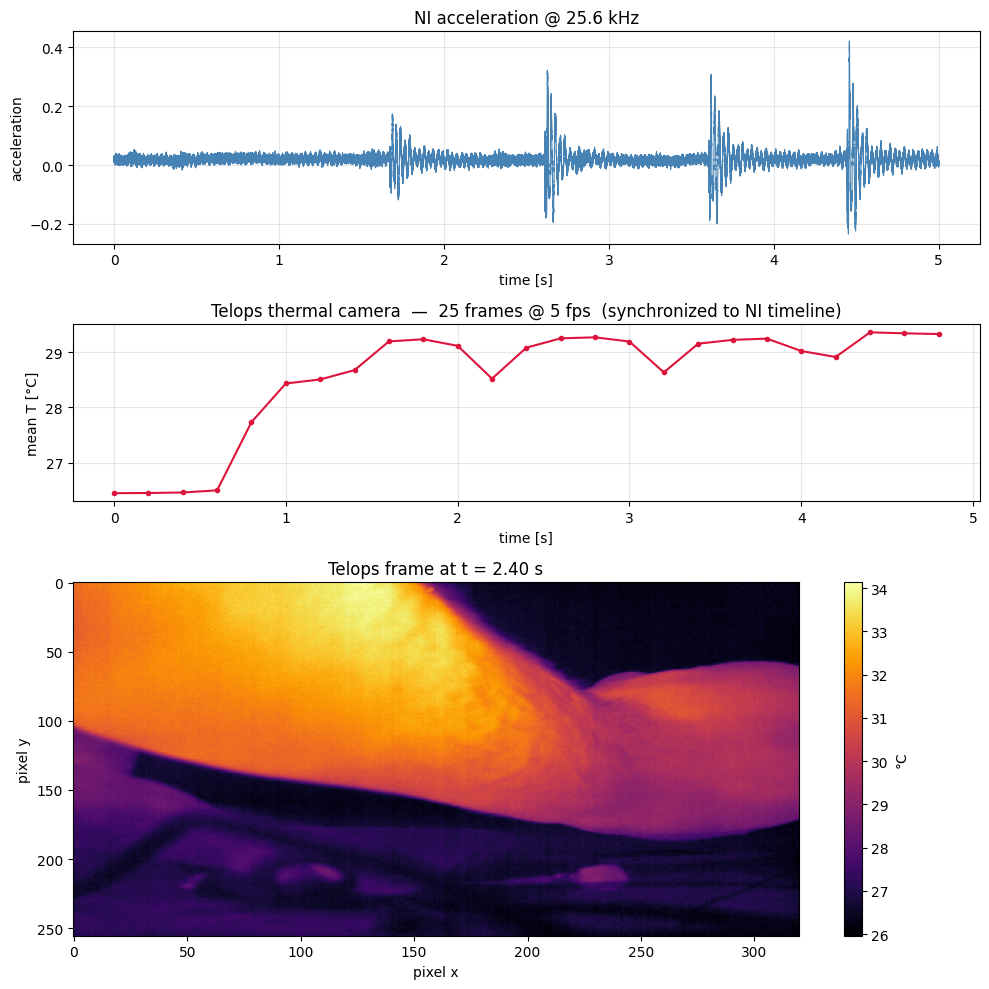
6. Plot the synchronized timeline#
Both sources share one common time axis. The accelerometer waveform and the camera’s mean temperature trace are plotted together.
[29]:
mean_temps = frames.mean(axis=(1, 2))

fig, axes = plt.subplots(3, 1, figsize=(10, 10),
                          gridspec_kw={"height_ratios": [1.2, 1, 2]})

# Acceleration (the structural response signal from the NI task)
axes[0].plot(t_acc, acceleration, lw=0.8, color="steelblue")
axes[0].set_xlabel("time [s]")
axes[0].set_ylabel("acceleration")
axes[0].set_title("NI acceleration @ 25.6 kHz")
axes[0].grid(alpha=0.3)

# Thermal mean temperature over the same time window
axes[1].plot(t_tel, mean_temps, lw=1.5, color="crimson", marker="o", ms=3)
axes[1].set_xlabel("time [s]")
axes[1].set_ylabel("mean T [°C]")
axes[1].set_title(
    f"Telops thermal camera: {len(t_tel)} frames "
    f"@ {len(t_tel)/t_tel[-1]:.0f} fps  (synchronized to NI timeline)"
)
axes[1].grid(alpha=0.3)

# Sample thermal frame from the middle of the recording
mid_idx = len(t_tel) // 2
im = axes[2].imshow(frames[mid_idx], cmap="inferno", aspect="equal")
axes[2].set_title(f"Telops frame at t = {t_tel[mid_idx]:.2f} s")
axes[2].set_xlabel("pixel x")
axes[2].set_ylabel("pixel y")
plt.colorbar(im, ax=axes[2], label="°C")

plt.tight_layout()
plt.show()
[ ]:
# The TelopsCamera plugin owns the camera lifecycle: it connects when the
# measurement starts and disconnects automatically when Core.run() returns.
# No manual teardown is needed here.
Conclusion#
Two acquisition sources, one Python API. TelopsCamera and the NI accelerometer were defined the same way, passed into the same
Core, and executed in one call.No vendor camera SDK. The Telops source needs no eBUS, PySpin, or pypylon. It is pure Python and numpy. The NI accelerometer uses an NI-MAX acquisition task, which this demo requires.
Synchronized timestamps. Both sources share a common time axis managed by LDAQ Core. Events can be cross-correlated.
Same code runs with FLIR or Basler cameras in place of Telops. The
BaseAcquisitioncontract is camera-agnostic.
To run without any hardware, replace LDAQ.national_instruments.NIAcquisition with LDAQ.simulator.SimulatedAcquisition; the rest of the workflow is unchanged.